
“Alexa: please partner Crestron”
The announcements in the CI press at the start of September announcing Amazon Alexa partnership and Sonos partnerships started a frenzy of chatter Crestron developer community both on unofficial and official forums. Now nearly into October and now technical detail on either of the releases has been made. The frustration for the integrators and system designers is that the residential end users have all seen the same press releases promising slick integration but the programmers don’t know what and how they are going to deliver.
Reading the Alexa Amazon keynote to the Cedia membership which seemed to trigger all the press releases Charlie Kindel ( what a great name to have working at Amazon!) says “We want to partner with all of you.”
He goes on to bring on example of the big players in the market including Crestron and Lutron who “boast an Alexa integration of their own” but again we are still waiting to see what these integrations will look like.
[h3]Crestron : special case for Alexa ; Custom Skill ; Smart Home Skill ?[/h3]
I started playing with the Alexa Skill kit back at the start of the summer but as the Alexa had not yet been released in the UK ( arriving tomorrow!) I limited my development to some minor projects discovering the architecture which is governed by Amazon.
There are two interaction skill types: Custom skill and Smart Home Skill
A Custom skill is the fully flexible skill where the developer must define the requests the skill can handle (intents) and the words users say to invoke those requests (utterances).
The architecture of the smart home skill is a less flexible version of the custom skill where API pre-defines requests and utterances
For this type of skill, the Smart Home Skill API defines:
The requests the skill can handle. These requests are called device directives. Examples include:
turn on / turn off
increase / decrease the temperature
change the dimness or brightness for a light
The words users say to make (or invoke) those requests. For example:
“turn off the living room lights”
“increase the temperature by two degrees”
“dim the living room lights to 20%”
The Cnet article and others talk about a change ,presumably to the home skills utterances allowing ‘home scenes’ in addition to lighting and heating which are currently the only supported.
“Those scene controls are a new trick in Alexa’s toolkit.
Until recently, Amazon’s voice-activated virtual assistant
could control individual lights and thermostats”
The Crestron press release talks about leveraging the Alexa Voice Service to “build voice controlled scenes”
The same article goes onto quote Crestron VP John Clancy and him talking about some customised commands that with some conditional logic (for e.g. based on time of day will carry out different tasks based on the time of day.
“The trade-off with those customised commands is that they aren’t native to Alexa’s programming, so you’ll need to add some extra verbiage to your command so that she knows what skill to access. Specifically, you’ll need to say “tell Crestron” before each command, as in “Alexa, tell Crestron it’s too dark in here.”
The above for me reading bewteen the lines is describing a Custom Skill with “Crestron” as the invocation name and “it’s too <dark> in here” is the intent and dark is the slot(parameter)
And as discussed in the Crestron press release we can expect some modules deployed for 3-series processors in October and for Pyng which will in some way allow easy integration.
[h3]Alexa Integrates with a Cloud Device Service [/h3]
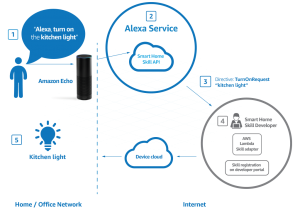
Alexa Home Skill Kit requires a couple of different sections of coding to get everything working.
The First is the Skills API which Amazon provides.
The 2nd is the AWS Skills Adaptor (which must be hosted on AWS) – This receives the request from the Smart home API and translates this to a API request on the Device Cloud.
This is where it gets interesting as for the Smart Home Skills home inking using Oauth2 is mandatory.
Now Crestron is well placed here as myCrestron is a cloud service that crestron has developed which is due to have a REST API released in the near future. Im sure that it will be possible to add an OAuth2 capability to the myCrestron device Cloud.
[h3]Alexa Controlling Sonos … controlling Crestron[/h3]
Sonos have also recently announced new partnerships and controlled access to their API. The most exciting is the ability of Alexa to control the Sonos system which tied up with multiple Amazon Dots could mean a Sonos multiroom audio system controlled with Alexa as the sole controller.
One of the other preffered partners is Spotify with hints that users will be able to control their Sonos content using the native Spotify app both on Mobile and desktop.
This gives the potential of mutliple controlling systems , Alexa, Spotify App and Crestron all controlling the Sonos Content. The stability of this kind of system will be reliant on two way reporting between these systems to allow the user to seamlessly chose their preferred control surface for that instant and in the case of the app or a Crestron Panel reflect correctly the current situation.
This is the controls love triangle if you will!
Exciting times in CI — the voice revolution is here Echo arrive in the UK on the 28th of September.

Also worth a look at the video from Cedia showing the Scene and Crestron Skill working at the Alexa Booth.
Neil Silver CTS,CSP
Is a developer working in controls and automation for corporate and residential Audio Visual
Development:
Crestron Simpl# , jQueryUI, PHP, Node.js, C#