We have had the pleasure of working closely with 2N over the last year on providing software that brings advanced features to the integration between 2N intercoms and Crestron Home.
This interface is intended to simplify the connection of your Crestron Home system to the popular 2N range of intercom hardware. Crestron users do not only receive video intercom calls on their Crestron panel, but they can natively control doors and gates with 2N devices through intuitive Tiles or Quick Action. They can also benefit from higher comfort and security thanks to new options for interconnection of the intercoms with other smart home appliances.
System integrators can now work better with intercoms relays and I/Os and add them to the Quick Actions. This makes door or gate control quick and intuitive from the Crestron panel or mobile app. With the support of the Crestron Actions & Events, the intercom events like Motion Detection, Noise Detection, or I/Os states can be linked with actions in other smart devices connected and managed by Crestron. The driver brings new customized scenarios and added value to the 2N intercoms and access units.
Two options are available based on the project type: Single home site or MDU
Our partner page on the 2N Integration Hub provides another resource for users of 2N looking to integrate with other systems.
This complements our own resources which can be found in our support section of this website
“It’s great to be working with the team at LCD who make integration of our products more straightforward for our clients.”
Password management is a challenge within an audio-visual (AV) project, just as it is for individual households and businesses. AV integrators use default admin passwords to simplify the hardware installation and credential management. But new infrastructure security laws are on the horizon, requiring AV integrators and installers to be more careful with privileged passwords.
On January 1, 2020, California implemented legislation through Senate Bill 327 that requires a unique preprogrammed password for each device. The UK is working on similar legislation called The Product Security and Telecommunications Infrastructure (PSTI) Bill that will take effect in 2022. Breaking these laws has significant penalties. So, AV integrators should pay attention.
Unique Password Challenges for AV Integrators
The new regulations mean that AV Integrators need to make password change management an integral part of the project planning. Integrators and installers have to set up unique passwords and have a reliable way to manage the individual passwords for subsequent administration of the controller boxes and connected AV devices.
Generally, an installer is the first person to touch an AV controller. But after the setup, the installer should not have visibility of the newly set password. So, AV integrators need a method to set passwords securely for multiple devices.
But multiple unique passwords create a scalability problem. When AV integrators connect to the hardware remotely for maintenance, they have to factory reset the units and start with default passwords. It can complicate hardware maintenance and become a bottleneck.
Our approach for More Efficient Password Management
At Lighting Control, we set up a complex common password for all devices during the commissioning phase of an AV project. We can work faster without dealing with unique passwords at this stage. Then, at the end of the commissioning process, we use scripting tools to improve the security of the systems and add multiple user accounts.
But if the scripting tools use plain text configuration files, the control passwords and IP configurations are easily accessible. It can become a potential security risk. So, we found that the best solution is to use PowerShell scripts with Active Directory (AD) accounts. As a result, the passwords are encrypted. It ensures that installers and users can run the scripts without accessing the credentials directly.
We hope our password management best practices help you with your AV projects. If you are interested in our AV products and AV consultancy services, please feel free to contact us today.
Neil Silver
Lead Developer LCD – Crestron Programmer , CSP
Managing the Development and Custom Programming Teams on a day to day basis and responsible for Product Design and Project Oversight.
Seven years on from the launch of the Amazon Alexa, we are still finding our way into touchless control of hardware and software. Voice technology has matured, and so has our understanding of when and how to use it. Other touchless solutions are now emerging and provide options in many situations. Implementing these new solutions and seeking acceptance and adoption from users is key to the evolution of touchless interfaces.
The Changing Landscape of Touchless Technology
Touchless technology allows users to control systems and devices without physical contact. In a post-pandemic world, audio-visual (AV) manufacturers are using existing and new technologies to create solutions that can help people return safely to public facilities like offices, hospitals, schools, hotels, and restaurants. The 2020 estimate for the gesture recognition and touchless sensing market was around 23.6 billion US dollars.
Like AV manufacturers, AV system integrators are also thinking creatively. Integrators are combining multiple technologies to create more holistic solutions for their clients. They are designing touchless systems to automate door access, control meeting room equipment, and manage lighting, video, and digital signage.
Here are a few noticeable trends in touchless experiences:
QR Code and BYOD Control Apps
Shared screens, buttons, and remote controls are popular control mechanisms for building management systems. But shared devices spread germs, and they are vulnerable to vandalism, theft, and displacement. So, AV manufacturers and system integrators are harnessing the power of QR codes, custom apps, and bring-your-own-device (BYOD) philosophy to build touchless AV systems. These systems require minimal infrastructure investment.
Mobile apps, phone cameras, and wearable devices are replacing shared control devices. For example, A QR code can be placed in the room in printed form and displayed on one of the screens. Users can download an app on their devices and scan the QR code to gain control of the meeting room equipment. It eliminates the need for touching the equipment controls to activate the screens, microphones, and cameras. Crestron One and Atlona Velocity are examples of QR-based BYOD control.
Touchless Access Control
Public facilities require access control for physical and digital security. But keycard-based access control adds a lot of bureaucracy. Issuing keycards to employees and visitors takes up time and resources.
Mobile app-based access control systems are faster and more efficient. Multifamily, commercial, and office spaces can use the apps to issue visitor permits, log visitation information, and track arrivals and departures. The systems can be enhanced using face recognition technology. A robust software-based access control solution automates the processes and decreases security errors. No more dangling keycards that someone forgot to deactivate.
Voice-Controlled Scheduling Systems
Digital assistants like Amazon Alexa and Google Home are crossing over to commercial applications. Businesses are using these voice technologies to install AV systems that respond to scheduling requests. Whether users want to book a conference room or connect to a remote location during a meeting, voice assistants are becoming part of modern enterprise infrastructure. AV Integrators are installing voice controllers in conference rooms and shared public spaces. The no-touch automation of scheduling tasks is providing a better user experience for AV customers.
AirPlay for Touchless Content Sharing
Apple AirPlay has made video streaming, screen mirroring, and file sharing easier over wireless connections. Meeting attendants can share content without using a dongle or a wired device. Also, users are already acquainted with the AirPlay user interface. So, familiarity has led to more customers using touchless content sharing.
For AV integrators, wireless and touchless content sharing has simplified equipment installation and maintenance. Integrators have fewer wired connections and proprietary software to consider. It has decreased their workloads and freed up resources.
Evolution of Audio Control with Alexa and Other Voice Assistants
Voice assistants like Amazon Alexa and Google Home are becoming central control systems for enterprises and small businesses. Voice assistants started as simple audio search engines, and they were initially useful only for digital information queries. But, they have entered the realm of the physical world with the help of the Internet of Things (IoT).
Today voice assistants have become a crucial part of controlling smart homes and offices. With voice assistants, users can control lighting, elevators, conferencing systems, digital displays, security cameras, door locks, and more. Voice technology providers let organizations integrate custom AV control systems through application programming interfaces (APIs) and software development kits (SDKs).
The Impact of Voice Assistants In the Professional AV Environment
For AV integrators, voice technology has changed the design, installation, and implementation of AV systems. Initially, AV integrators assumed voice assistant integration would require more proprietary hardware and software installations. However, as the technology matures and more wireless and IoT-based solutions come into the market, voice assistant technology makes AV integration easier.
AV manufacturers are using Amazon Alexa, Google Home, and Google Nest as an integral part of their design. It is leading to more standardized solutions and opening new opportunities. AV integrators can use the standard APIs and SDKs to design customized solutions compatible with multiple AV vendors.
Touchless Solutions for Assistive Technology
A side benefit of touchless user interfaces is that the solutions provide more accessibility. Disabled people can use voice-activated controls to open doors, turn on lights, or activate and control AV equipment.
The Future of Touchless Solutions
Touchless technology has come a long way. But it is still an evolving field. New and exciting developments are already on the horizon. Here are a few things that might be interesting:
Motion Capture and Gesture Recognition: Advanced motion sensors will make it easier to control AV environments without any additional control devices. It might remove the necessity for BYOD devices. Combining voice recognition, face recognition, and gesture control will make the new systems true touchless experiences.
Mind-Controlled Interface: Scientists are developing brain-computer interfaces. These interfaces will allow users to issue commands without using voice technology. It will open new avenues for no-touch applications.
Haptic Interface: A challenge of using touchless technology is the absence of touch. Our brains have a difficult time understanding objects without tactile sensations. Haptic interface generates the feeling of touch, allowing users to manipulate objects more accurately. Imagine drawing on-screen using your fingers and having more tactile feedback during the process.
Touchless technology has already transformed the AV industry, and we can expect more innovations to bring better solutions in the future. If you want to learn more about implementing touchless technology and our consultancy services, please feel free to contact us today.
Working with 4GD and Nucleus AV the team at LCD created a control system for immersive training. Here is what the Judges thought!
“A remarkable use of Crestron technologies with the resulting project exceeding client expectations. Truly a project fuelled by pure innovation, relying on Nucleus to deliver a solution to the client’s unique requirements.”
– Judge Sarah Joyce
This project’s goal is to provide close quarters combat training for the British Army for a range of environments, that are traditionally difficult to simulate. These environments can be both physically and digitally reconfigured, allowing a countless number of permutations. The end result creates an immersive experience to simulate different geographical locations that can be anything from a jungle to a marketplace with a “God’s Eye View” of the facility for those in charge.
A big challenge was to allow for briefing, training and debriefing to take place all at the same time, including a dedicated physical training space and remote interaction with wrap-around screens to provide an easy-to-use solution that any instructor can use with little to no training on the system.
Being a project of many firsts, Nucleus developed solutions to allow the trainer to control visible light, infra-red light, sound effects, door sensors, and ‘surprises’ for soldiers via an iPad, all configured and controlled by Crestron, as well as an After Action Review CCTV system
A spokseperson from 4GD said: “This is the bleeding edge of military training. Our intention is to use technology to make training better and, as a result, troops safer. The critical requirements of immersion, reconfigurability and ease of use push the capability of the control system, its programming and interface. Nucleus have worked closely with us to help facilitate this ambitious strategy with a never ending “can-do” attitude. Some of the features of this project have shown both Nucleus as a market-leading integrator and the near limitless potential of the Crestron ecosystem.”
How to integrate software developers into your AV team
The AV industry is going through a paradigm shift. New technology, APIs, drivers, and control modules have decreased the need for custom AV control programming. So, the industry is moving towards more holistic solutions.
Software developers are coming into the AV industry to help develop comprehensive AV applications. However, the software developers do not have the same depth of knowledge about AV control systems. They might not even know what Digital Signal Processing (DSP) is or how to optimize AV installations!
In this new hybrid environment, where control programmers and software developers have to work side-by-side, AV integrators must understand the differences between the two disciplines.
Traditional AV programmers vs. software developers
Traditional AV programmers are domain experts in the AV control space. They have deep knowledge about proprietary AV languages. An AV programmer might know the ins and outs of a language like Crestron SIMPL or AMX NetLinx as proprietary languages are not well-known outside of the industry, AV programmers learn through years of hands-on training, experimentation, and experience.
Software developers have more knowledge about developing larger applications to meet user specifications. Developers program in languages like C#, C++, JAVA, PHP, HTML5, CSS, etc. They might not understand the inner workings of AV hardware, but they have more experience interfacing various components (hardware and software) to develop for more complex user experiences.
Defining scope of work for software developers in an AV project
As AV integrators start working with more software developers, it is crucial to understand integrators might not find the same AV industry-specific expertise in software developers.
Software developers work in various industries to develop applications. For example, a software developer might develop a stock application for a stock brokerage firm without having financial training. The brokerage firm has to clearly define the scope of the application to get the best outcome.
Similarly, in the AV industry, integrators need to define the objectives of the AV application clearly. Due to the advances in modern AV products, system-level knowledge like DSP programming might not be necessary to develop applications that serve the customers.
The future of AV control development
Even though the AV industry is trending towards software development, control programmers will still have a part to play. Manufacturer’s APIs, drivers, and control modules might ship with bugs. Control programmers can deal with these hardware-level issues more efficiently.
Software developers and control programmers could share knowledge to increase their expertise. Developers can learn from control programmers about custom control management, while control programmers can learn from software developers about full-stack application development.
Ideally, a development team with control programming and software development expertise can provide the most elegant solutions.
If you want to learn more about our AV consulting services, please don’t hesitate to contact us. We have cultivated a culture of developing custom solutions with the best software life-cycle practices.
As the demand for smart home automation grows, AV system designs for multi-dwelling units (MDUs) become more complex. AV system integrators need simple, repeatable, and configurable solutions to provide more functionalities faster.
Custom software and extension drivers can help. Software solutions are more scalable and easier to maintain. So, a system designed with software components can help you serve your Crestron Home MDU customers better.
Below are some reasons to use extension drivers:
Simplify Your Commercial and Residential MDU Integration
Deployment-ready Crestron Home extension drivers can improve the development, implementation, and support of your MDU systems. You don’t have to start from scratch every time you add a device or functionality.
After installing the base infrastructure, you can leverage the power of available software packages to extend system features. You will be able to provide more value than your competitors without complicating your Crestron Home MDU installation process.
Create Unique Smart Home Experiences
The plug-and-play nature of extension drivers gives you the option to develop new experiences for your customers quickly. You can combine software packages to tailor solutions that feel custom-made.
New Crestron Home extension drivers for lighting, heating, shading, audio, and video can open up new possibilities. Your Crestron Home MDU system will be more adaptable to the changing needs of your customers. When a new device is available, you can integrate it into the system without costly rewiring.
Easier Path to New Revenue Streams
You can use software-based solutions to create multi-tiered upgrade options for your customers. Homeowners in the same MDU might have different preferences.
One homeowner might want a fully automated shading and lighting system to control ambiance, while another owner might want to stick to basic on/off features. With software-based controls, you have more leeway to craft various solutions for your customers and open new revenue streams by upselling solutions.
Our Experience with Crestron Home MDU
We recently helped TECCO, an Australia-based Smart Building and Home System Integrator, with a large 130-unit MDU system implementation.
We provided software solutions and consultancy services
Our extension drivers made new functionalities possible without costly additional wiring
We adapted our solutions to make the deployment simple and effective for the MDU
We have also worked on a 15-unit MDU to implement a similar solution.
Our experience with extension drivers makes us one of the premium development consultants for Crestron Home MDU integrators. We can help you develop unique and value-added solutions for your customers.
If you want to learn more about our Crestron Home extension drivers and our consultancy services, please feel free to contact us today.
Please feel free to subscribe to our newsletter to learn about our Crestron drivers and other products.
A high-quality audio-visual (AV) system is an essential feature of today’s luxury home or office. The AV industry is benefitting. Even with the COVID-19 slowdown, the global pro AV market is expected to grow from $159 billion in 2020 to $304 billion by 2027.
When purchasing AV equipment, homeowners look for solutions that are easy to install, maintain and upgrade. Better control integration modules improve AV hardware usability. So, AV manufacturers and integrators who provide a better user experience gain more market share.
Benefits of Developing AV Control Integration Modules/Drivers
Customized drivers make life easier for everyone. Here are some potential upsides:
Faster Installation and Integration
With ready-made drivers, AV system integrators can quickly put the hardware together. So, system integrators like working with manufacturers who provide high-quality control drivers.
In case there are no drivers, integration companies can work with third-party developers to build a custom suite of drivers. Then, integrators can reuse these modules for new projects. It speeds up the integration process.
More Market Share and Lower Cost
Hardware manufacturers provide drivers to entice system integrators and consumers. So, a user-friendly integration module is a competitive advantage.
AV system integrators like to create their custom drivers because it saves money for future projects. System integrators can pass the cost savings to the home and office space owners.
Ease of Use for Customers
A professional driver developer can write integration modules for your hardware that meet the needs of the end-users. Users do not have to deal with out-of-date or complicated interfaces. Developers can help create modern interfaces that users can easily configure and control.
Crestron Drivers to Meet Homeowner Needs
We specialize in developing Crestron drivers. From our personal experience, we have seen homeowners appreciate our control modules.
Homeowners can easily set up and control their Crestron-supported home devices from the Crestron Home app. They are in control of the AV system. When system integrators help homeowners install a new system, integrators can pick and choose the drivers. So, it is easier to set up a new customer.
Our Crestron drivers help create a scalable and sustainable AV ecosystem. We work with manufacturers, system integrators, and homeowners to develop adaptable integration modules.
Please feel free to subscribe to our newsletter to learn about our Crestron drivers and other products.
Over the last 12 months the global pandemic has given us the opportunity to develop plans on new parts of our business. Modules have always been a part of our business as our work in Crestron Custom means we often have to create modules for use in our own projects.
At the same time Crestron’s long term project to move to a standardized platform for driver development has come of age with the release of the v4 SDK. Lighting Control have been involved as a close development partner on both the SDK and Crestron Home (one of the supported operating environments).
The aim of the standardized model is that drivers will be compatible across the range of Crestron systems including Crestron Home, AV Framework , DM and NVX Endpoints and in the cloud as part of Crestron XiO Cloud.
Taking an active part in the pilot program for both the drivers SDK and Crestron Home has been a satisfying project as we have been able to contribute our piece to the progress of the ecosystem both in documentation, systems , processes and flushing out features.
Our project, to setup and launch our Drivers store for Crestron Home, has been a long term investment in the systems, processes and talent we require to be a serious b2b partner across the ecosystem in the years to come.
We had working drivers back in November of 2019 but I realized that we didn’t have all of the processes and tools in place to maintain, support and be agile in our approach to new requirements at scale.
We are excited to have Neil and the team at Lighting Control working on Crestron Drivers. We hope that their enthusiasm and investment in the program will prove beneficial to all Crestron partners going forward.
Ara Seferian | Sr. Product Manager , Digital workplace Crestron Electronics Inc
Build
Implemented an Automated Build process for our Drivers
Common Functionality coded using best practices
Base Types allowing consistency of user experience and easier testability
Code Driven User interface
Automated Documentation Build
Build Updates production Downloads directly meaning updates are immediately available
Testing
Unit Testing of helper methods and hardware interfaces.
Implemented Integration Testing using dedicated hardware.
Implemented Internal Compliance Testing of Crestron Home Driver Packages.
Process
Server move of our existing website and upgrades to back end systems
Addition of webstore and integration of our existing support systems
Addition of new Internal and External Knowledge base systems
Creation of a Library of “how to” guides, both video and print
Creation of a bespoke licensing system with self-serve functionality
Looking forward
So with this base in place we are now well positioned to offer continued additional items to our Crestron Home catalogue and we are already working with manufacturers who want a partner in this field to assist them with integration with this or other platforms. With exciting new developments looming in the other Crestron platforms in the coming months we look forward to developing partnerships in this area.
Times are not normal just now and I never expected to be writing a blog post about what my business is not doing!
Practical day to day and what the business isdoing!
With restrictions on movement, and due to the nature of most of our works being Lighting Control, we are currently operating a very restricted service.
All of our on-site works for non-essential sites/projects have stopped although we continue to provide some remote support to customers.
We have a small number of projects in the development phase which the relevant team-members continue to work on from home.
The AV industry and Software industry more widely
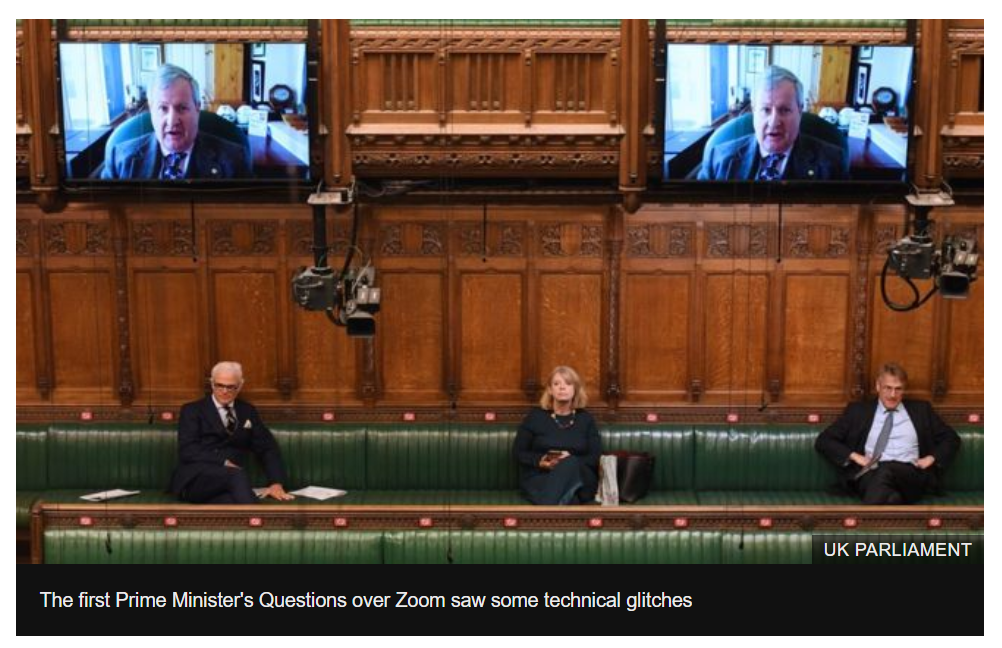
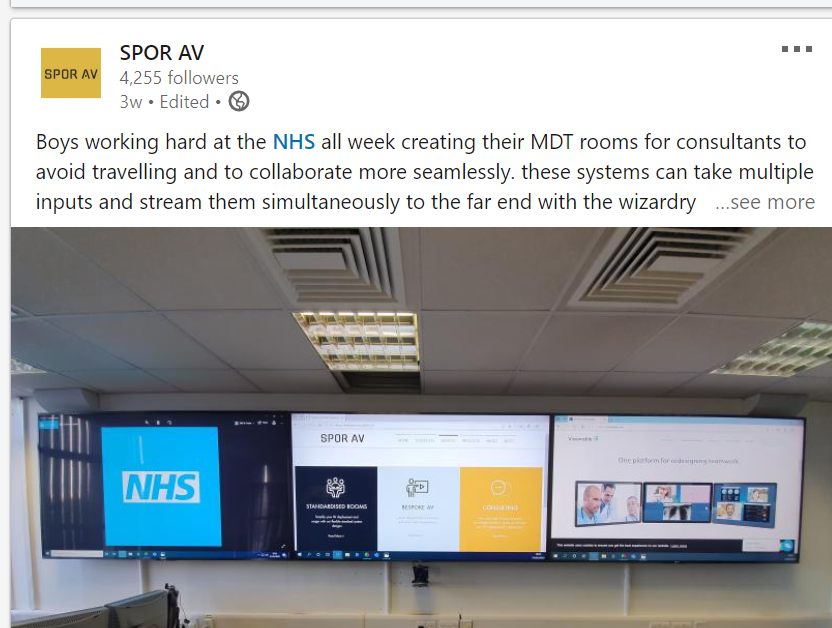
The AV industry, as part of the larger communication sector, is classed as an essential sector and we have seen in the mainstream media examples of AV at work as part of the Covid crisis response. Supporting the daily briefings, projects to add virtual support to government committees and indeed the main parliament chambers in Westminster and Holyrood and projects helping healthcare professionals collaborate with their peers and offer their services remotely to patients.
In the AV industry consultants, designers and integrators have always struggled with defining the functionality of systems.
I’m not talking about the process of gathering the requirement here but of documenting it.
We produce, mostly, great schematics which define the boundaries of the possible based on the hardware. The idea of these drawings containing black boxes which are highly configurable is not new.
Black boxes, by my definition, differ from other hardware items on a system drawing as although they may have a static number of input and output ports their core functionality is open to a high level of configuration.
A display has, potentially, a few functions. It’s a video switcher, a display, an amplifier with onboard speakers, it even has some control features including auto switching of the video switch and volume control of the amplified sound level.
Take for example a display with a single connected HDMI and RS232.
Display Schematic
It’s reasonable to glean from a schematic alone that the functionality of this piece of hardware in this system is to display a video stream of the connected source and that power and input control will be using the RS232 port.
Contrast this with a control processor pre-Ethernet.
A control system processor does stuff.
Take a simple system with a two-button keypad and a display.
A Schematic showing a control system a content player and a display accurately describes the system. On functionality we can make some assumptions but without some additional information they are just that.
It is possible that: Button 1 turns system on and Button 2 turns system off.
However, it is also possible that: System turns on and off based on an internal timeclock and Button 1 raises volume and button 2 lowers volume.
To discover the actual requirement we need a functional scope which has hopefully been produced by some good needs analysis that informed the system design.
Control systems in the form of processors and touch panels with IO allowing control over 3rd party devices have been around since the 80’s and the discussion over how to specify their operation has produced little in the way of standards.
Infocomm, pre Avixa did some good work on this but this is not widely adopted across the industry. Crestron’s CAIP scheme and subsequently CSP (Crestron service providers) has, at its core, the requirement for programmers to produce a functional specification but even this is not standardised across the body of CSP’s.
DSP’s are common place in mid to large systems. Again these are of course by our definition black boxes.
But like
traditional non Ethernet connected control systems DSP’s pre Dante and Digital
had fixed number of inputs and outputs. Even post Digital standard such as OBAM
proprietary hardware such as IO extenders also included on the schematic would
ultimately define the inputs and outputs of the system.
The Functionality of the processing going on in that DSP must be defined just like a control system. The language of this definition is often tied in with the control system which provides control IO to this audio processing however audio processing has a language of it’s own. These boxes provide room and system specific equalisation, gain structure, Acoustic Echo Cancelling along with VOIP functionality.
Often the DSP tools are graphical in their nature providing a schematic like trail which defines that dynamic functionality of the DSP. In our system functionality specifications we define all interactions between control system and the audio processor.
The new world “Not just black boxes but hidden lines”.
Dante Spoken Here
Although the change has been coming over the years for me the, “Dante Spoken Here”, sign at the ISE Show in 2018 all over the show were the sign that Audio over IP was now wide spread.
Now
Schematics don’t just contain black boxes but hidden lines! The traditional
skill of tracing a signal path through a schematic from input to output becomes
a whole new skill.
A single
LAN connection to a device can be obfuscating control, video and audio in that
single cable and potentially multiple routes to disparate locations.
One approach to this by engineers is to view the IO potential in a traditional way and connect it all up like a patch panel. I have found systems where all 64 Dante channels are connected from DSP to Audio Desk for “future use” but for me this misses the point.
It’s the same misunderstanding as coding an object oriented code in a single file monolith.
In the
world of Dante in addition to the Schematic which shows the physical
connections between devices documentation showing the network routes must be
created intelligently based on the functional requirements of the system.
These
routes need to be well named for system maintainability and usability.
Having Multiple Dante 1, Dante 2 ,Dante 3 around a system dont mean anything. These should have a Name or Numbering convention just like cables.
These concepts of defining the routes apply to other types of audio over digital such as USB IO.
Dante I/O How many In’s and Out’s?
Add to
this video over IP in whatever flavour is being used or in some cases a mix of
different types.
Listing video
encoders and video decoders on a drawing doesn’t tell you what routing
possibilities you might need to setup. Some devices in the market can be
configured to be Decoders and Encoders but the Fixed IO on the device doesn’t
always inform you on this without some further information.
Are
devices to be matrixed or is the system designed as a one to many DA?
Are you using audio breakaway on the encoders / decoders?
And in a
final twist some of these products also in addition to all of the above speak
Dante so need to be included in your Dante routes.
These
challenges are real for us in our day to day business where provided with schematics
for a project we need to suck out the functional intent from the pre-sales
design engineers and the project engineers.
We often
work with the designers explaining to them the additional documentation we need
to produce to clarify to the programmers and commissioning engineers what they
need to implement.
Virtual Matrix Drawings
VLAN Network Design Drawings
Dante Routing Naming Schedules
GUI Functional Requirements
Automation Functional Requirements
Audio System Functional Requirements
If you need help with filling in the gaps reach out to us to help!
We use cookies on our website to give you the most relevant experience by remembering your preferences and repeat visits. By clicking “Accept”, you consent to the use of ALL the cookies.
This website uses cookies to improve your experience while you navigate through the website. Out of these, the cookies that are categorized as necessary are stored on your browser as they are essential for the working of basic functionalities of the website. We also use third-party cookies that help us analyze and understand how you use this website. These cookies will be stored in your browser only with your consent. You also have the option to opt-out of these cookies. But opting out of some of these cookies may affect your browsing experience.
Necessary cookies are absolutely essential for the website to function properly. This category only includes cookies that ensures basic functionalities and security features of the website. These cookies do not store any personal information.
Any cookies that may not be particularly necessary for the website to function and is used specifically to collect user personal data via analytics, ads, other embedded contents are termed as non-necessary cookies. It is mandatory to procure user consent prior to running these cookies on your website.